Make.com + Twilio SMS Reminders: A Practical Automation for Service Businesses
See how a service business can connect Google Calendar, Make.com, and Twilio to send SMS confirmations, appointment reminders, and staff alerts.
Missed appointments are often a workflow problem
A customer books, the details land in a calendar, and everyone assumes the appointment will happen. Then the day arrives and the customer has forgotten the time, cannot find the address, or does not know how to reschedule. The team spends part of the morning calling, checking messages, and rearranging work.
An automated reminder system cannot eliminate every cancellation or no-show. It can remove preventable confusion. The useful version confirms the appointment immediately, sends a reminder at the right time, gives the customer a simple next step, and tells a real person when the automation needs help.
That is where Make.com and Twilio fit together. Make.com coordinates the workflow and data. Twilio handles the SMS messages and incoming replies. The business keeps its existing calendar, form, or CRM when those tools can provide the information the workflow needs.
What Make.com does in the system
Make.com is the orchestration layer. A booking form, calendar event, CRM update, or webhook can trigger a scenario. Make then checks the appointment data, formats the customer phone number, calculates when reminders should run, selects the right message, and sends the next action to Twilio.
Make supports instant webhook triggers as well as scheduled scenarios. That gives a service business two common options: react as soon as a booking is created, or periodically check for appointments that are approaching a reminder window.
The scenario should also handle exceptions. Missing phone numbers, canceled appointments, duplicate bookings, failed messages, and late changes need a defined route instead of quietly disappearing inside an automation log.
How a Google Calendar and Twilio integration works
Google Calendar can act as the appointment source for a straightforward reminder workflow. Make.com watches for a new or updated calendar event, reads approved fields such as the appointment time and customer phone number, and passes the prepared message to Twilio for delivery.
The integration should also recognize cancellations, rescheduled events, missing phone numbers, and time-zone differences. After Twilio sends the confirmation or reminder, Make.com can write the delivery or reply status back to a calendar description, spreadsheet, CRM, or staff notification channel.
A Google Calendar and Twilio integration works best when the calendar data is consistent and the team agrees on which event fields are safe to use. The automation should send only the information the customer needs and route unexpected replies to a person.
What Twilio does in the system
Twilio provides the programmable messaging layer. The workflow can create an SMS confirmation, schedule or send a reminder, track delivery status, and pass incoming customer replies to a webhook for the next decision.
A reply such as C to confirm can update the appointment record. A cancellation or reschedule request can alert the team, send the appropriate link, or create a task for a person to follow up. The exact response flow should match how the business already manages its schedule.
Twilio also provides messaging services, logs, delivery information, and opt-out controls. Those operational details matter because a reminder system is only useful when the team can monitor it and customers can control whether they receive messages.
The five-part reminder flow
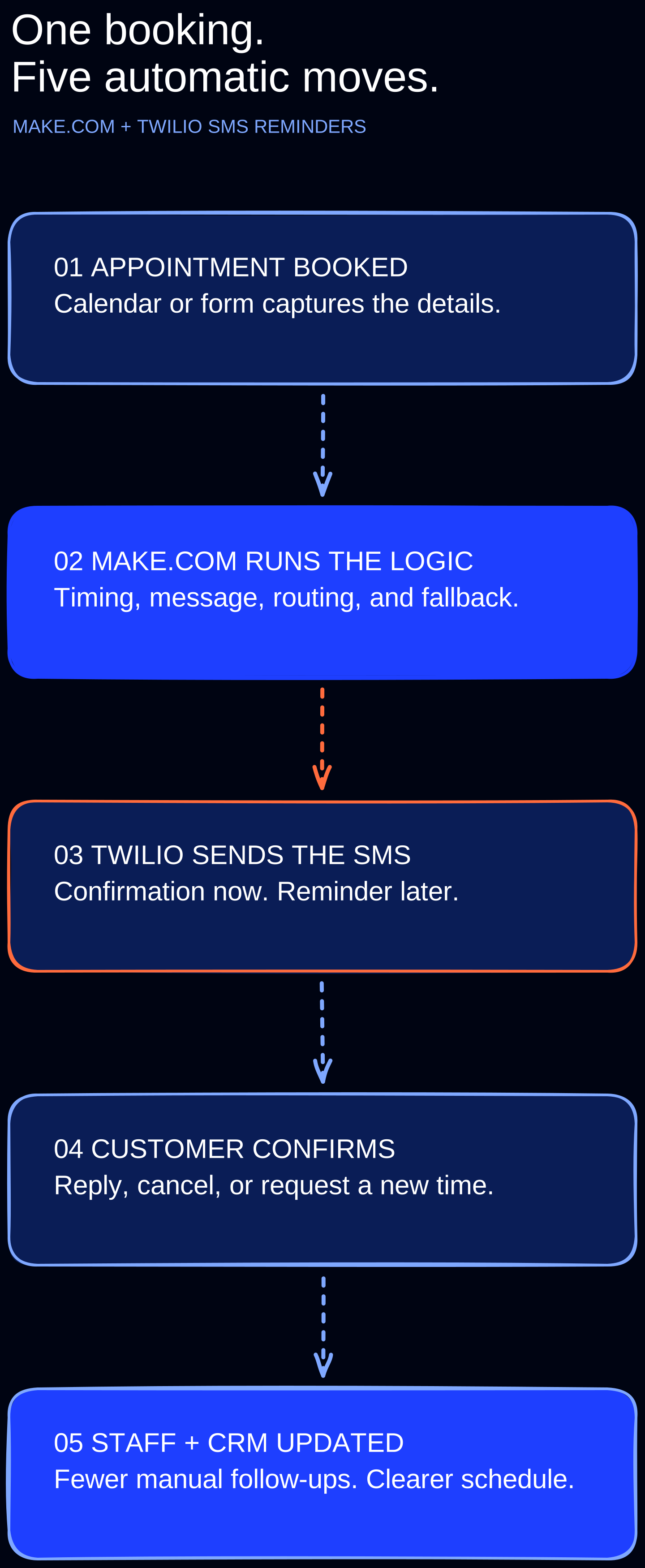
The strongest starting point is a small workflow with clear ownership. Build the path, test it with real booking scenarios, and add complexity only after the team trusts the core sequence.
- Appointment booked: capture the service, date, time, customer name, mobile number, location, and booking status.
- Workflow prepared: validate the data, normalize the phone number, calculate the reminder time, and choose the correct template.
- SMS sent: confirm the booking immediately, then send a useful reminder before the appointment.
- Customer response handled: record a confirmation or route cancellation and reschedule requests to the right next step.
- Team and system updated: write the status back to the calendar or CRM and alert staff when human follow-up is needed.
Useful messages are short, specific, and actionable
The message should help the customer do something. Include the business name, appointment time, essential preparation or arrival details, and the approved response options. Do not pack sensitive information into a text message just because the workflow has access to it.
A confirmation can say: “GEMS Demo Services: You are booked for Tuesday at 2:00 PM. Reply C to confirm or R if you need to reschedule. Reply STOP to unsubscribe.” A later reminder can repeat the time and provide the address, arrival instructions, or reschedule link the customer is most likely to need.
Message templates should be reviewed by the business before launch. Tone, timing, quiet hours, languages, service-specific instructions, and escalation rules all affect the customer experience.
Keep a person in the loop
Automation should make the team more responsive, not make the customer feel trapped. A reply that does not match an expected keyword should create an alert or conversation for a staff member. The same is true when a customer asks a real question, a message fails, or an appointment changes close to the start time.
This human fallback is especially important for businesses with urgent work, complex estimates, sensitive customer situations, or schedules that move throughout the day. The system handles repetition. People handle judgment.
Consent and compliance belong in the build
A business needs appropriate consent before sending automated messages. Twilio's current Messaging Policy requires the initial message to include a clear opt-out instruction such as “Reply STOP to unsubscribe,” and recipients must be able to revoke consent in a straightforward way.
For application-to-person SMS sent to US recipients from a 10-digit long code, Twilio says A2P 10DLC registration is required. Registration identifies the sender and campaign, including how people opt in, opt out, and request help. Toll-free and short-code messaging have different registration and operational requirements.
Compliance is not a checkbox added after the workflow works. Consent records, sender identity, opt-out handling, message purpose, quiet hours, and data retention should be part of the design. Businesses should also obtain legal guidance when their industry, location, or use case creates additional requirements.
Which service businesses can use this
The pattern works best when appointments or scheduled visits are central to the business and the team currently relies on manual texts, calls, or memory. The workflow can be adapted to the booking system and the amount of human review the company needs.
- Home-service companies scheduling estimates, installations, and maintenance visits.
- Salons, studios, photographers, trainers, and other appointment-based teams.
- Consultants and agencies scheduling discovery calls, reviews, and client sessions.
- Automotive and repair businesses coordinating drop-off, pickup, and approval steps.
- Professional practices that can design a compliant flow without sending sensitive details by SMS.
How GEMS Media approaches the implementation
We start by mapping the current booking and follow-up process. That reveals the actual source of truth, the moments where customers become confused, and the steps that still require a person. Then we build the smallest dependable workflow around those realities.
A GEMS implementation can include the booking trigger, Make.com scenario, Twilio messaging service, message templates, two-way reply routing, CRM or calendar updates, failure alerts, testing, and a simple operating guide for the team.
The goal is not to add software for the sake of automation. It is to create a clearer customer experience and protect staff time without making the business harder to run. If automated confirmations and reminders would improve your schedule, request a quote or book a workflow audit with GEMS Media.
Sources and further reading
Related GEMS insights
Want GEMS to build your reminder workflow?
We can map your booking process, connect the right tools, configure compliant SMS messaging, test the handoffs, and give your team a system it can actually operate.